- Home Page /
- Office Products /
- Office Electronics /
- Printers & Accessories /
- Computer Printers /
- Photo Printers /
- Desktop Photo Printers /
- HP Officejet 6700 Premium e-All-in-One Wirele...
0 ratings

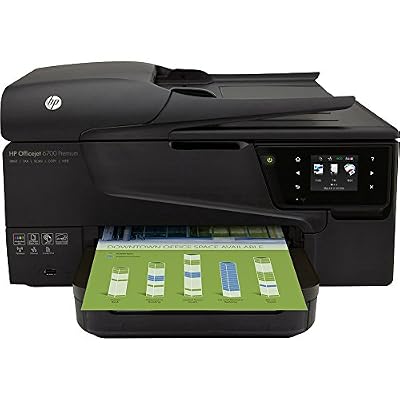
HP Officejet 6700 Premium e-All-in-One Wireless Color Photo Printer with Scanner, Copier and Fax
0 ratings
Write a review
Out of stock
 Imported from USA store
Secured transaction
Ubuy works hard to protect your security and privacy. Our advanced payment security system ensures confidentiality by encrypting your information during transmission using AES (Advanced Encryption Standards) and SSL (Secure Socket Layer) protocols. Your payment details are 100% secure as we do not share your payment details with third party sellers.
Our Top Logistics Partners


Print professional color for a low cost per page with the HP Officejet 6700 Premium e-All-in-One

Fast
Shipping

Free
Return*

Secure Packaging

100% Original Products

PCI DSS Compliance

ISO 27001 Certified


Note: Step Down Voltage Transformer required for using electronics products of US store (110-120). Recommended power converters Buy Now.


What Stands Out
Versatile All-in-One
Combining printing, scanning, copying, and faxing, this device serves multiple office needs, saving space and improving productivity for home and small business users.
Wireless Connectivity
Easily connect to your network through Wi-Fi, allowing hassle-free printing from smartphones, tablets, and computers without the need for cables, enhancing convenience and flexibility.
High-Quality Prints
Delivers stunning color photos and sharp documents with exceptional print resolution, ensuring professional-quality results that meet the demands of both personal and professional projects.
Product Details
- Professional color printing at a low cost per page
- HP ePrint for mobile printing from smartphone or tablet
- 2.65-inch touchscreen for accessing business apps and managing print jobs
- Convenient wired and wireless networking
- High-speed printing with 250-sheet paper tray and 35-sheet automatic document feeder
- Energy-saving features with up to 40% energy savings
| Item Weight | 14 lbs (6.35 kg) |
Who Should Buy?

-
Small Businesses
Ideal for small businesses needing an all-in-one printer for quality printing, scanning, faxing, and copying capabilities.
-
Home Offices
Perfect for home office users who need versatility and reliable printing without occupying too much space.
-
Photography Enthusiasts
Great for amateur photographers wanting to print high-quality color photos conveniently from home.

-
Heavy Users
Not suitable for users who print large volumes regularly, as it may not handle heavy workloads efficiently.
-
Budget-Conscious
May not appeal to users looking for a low-cost option, given the ongoing ink and maintenance expenses.
-
Limited Space
Not ideal for users with very limited space, as it requires a decent amount of room for full functionality.
Product Description
HP Officejet 6700 Premium e-All-in-One Wireless Color Photo Printer with Scanner, Copier and Fax
Have any Query? Chat with us
Customer Questions & Answers
-
Question:
What are the key features of the HP Officejet 6700 Premium e-All-in-One printer?
Answer: The HP Officejet 6700 Premium e-All-in-One printer offers versatile functionalities, including wireless printing, scanning, copying, and faxing. It supports color photo printing with high-resolution output, ensuring vibrant and clear images. The printer is designed for both home and office use, with features like duplex printing for efficiency and a user-friendly touchscreen display for easy navigation. This makes it ideal for users who need a reliable multi-functional machine for everyday tasks, from printing documents to managing important correspondence. -
Question:
Is the HP Officejet 6700 Premium compatible with mobile printing platforms?
Answer: Yes, the HP Officejet 6700 Premium supports mobile printing through various platforms including HP ePrint, Apple AirPrint, and Google Cloud Print. This allows users to print directly from their smartphones, tablets, and laptops without needing to connect via cables. The adaptability of mobile printing makes it convenient for individuals who are often on-the-go or prefer to manage printing tasks from their personal devices, facilitating a seamless work-from-home experience. -
Question:
How can I connect my HP Officejet 6700 Premium printer to my Wi-Fi network?
Answer: To connect your HP Officejet 6700 Premium to your Wi-Fi network, begin by turning on the printer and accessing the settings menu using the touchscreen display. Select 'Network Setup' and then 'Wireless Setup Wizard.' Follow the prompts to choose your Wi-Fi network and enter the password. This wireless connectivity allows you to print from multiple devices across your home or office, enhancing productivity by enabling printing from anywhere within range of your Wi-Fi signal. -
Question:
What kind of print quality can I expect from the HP Officejet 6700 Premium?
Answer: The print quality from the HP Officejet 6700 Premium is impressive, with a maximum color resolution of up to 4800 x 1200 optimized dpi when using HP Advanced Photo Paper. Users can expect crisp text and vibrant colors that make this printer suitable for both professional documents and personal photo projects. Whether preparing a presentation or printing family photos, the quality ensures that all printouts look polished and appealing. -
Question:
What types of paper can I use with the HP Officejet 6700 Premium?
Answer: The HP Officejet 6700 Premium is compatible with various paper types, including plain paper, photo paper, and specialty media. It supports different sizes ranging from letter size to envelopes and labels. This versatility makes the printer suitable for various projects, whether you’re printing business reports or creating high-quality photo prints for keepsakes. Choosing the right paper type can enhance your output quality, aligning with your specific printing needs. -
Question:
Can the HP Officejet 6700 Premium handle large print jobs?
Answer: Yes, the HP Officejet 6700 Premium is designed to handle larger print jobs efficiently. With a monthly duty cycle of up to 15,000 pages and an input tray that can hold up to 250 sheets of paper, this printer is built for productivity. This makes it an excellent choice for small offices or home setups where high-volume printing is required, allowing users to print large batches of documents without frequent interruptions for paper refills. -
Question:
Does the HP Officejet 6700 Premium have an automatic document feeder?
Answer: Yes, the HP Officejet 6700 Premium features an automatic document feeder (ADF) that can accommodate up to 35 sheets. This feature allows users to scan, copy, or fax multiple pages quickly and efficiently without manual intervention. It enhances workflow efficiency, especially for professionals who need to digitize paper documents or send multi-page faxes, making it a practical tool for managing time-sensitive tasks. -
Question:
What is the recommended ink for the HP Officejet 6700 Premium?
Answer: The recommended ink for the HP Officejet 6700 Premium includes HP 932 and HP 933 cartridges. These cartridges provide high-quality prints with consistent color vibrancy and sharp text. Choosing genuine HP ink not only enhances print quality but also ensures compatibility and reliability, reducing the chance of print issues. For users printing frequently, opting for high-capacity cartridges can be more economical and reduce the need for regular replacements. -
Question:
Is the HP Officejet 6700 Premium printer suitable for photo printing?
Answer: Absolutely, the HP Officejet 6700 Premium is well-suited for photo printing. It supports a variety of photo paper types and delivers high-resolution prints that capture the detail and color richness of your images. The printer's capabilities make it a great choice for photographers and hobbyists looking to print professional-quality photos at home. Whether printing family portraits or art projects, it provides exceptional results that can be framed or shared. -
Question:
Where can I buy HP Officejet 6700 Premium e-All-in-One Wireless Color Photo Printer with Scanner, Copier and Fax?
Answer: You can purchase the HP Officejet 6700 Premium e-All-in-One printer from Ubuy in Greece. They offer a user-friendly online shopping experience with a wide selection of HP products, ensuring that you can find the right printer to meet your needs. Ubuy often provides insight into product features, helping customers make informed decisions on their purchases.
HP Desktop Photo Printers Editorial Review
The HP Officejet 6700 Premium printer has received mixed reviews from customers. Some customers have reported that the printer works fine and has no problems, while others have had issues with ink cartridges, printer connectivity, and missing parts. Additionally, some customers have been dissatisfied with HP's customer service. Overall, the printer has been described as an ink hog and not worth the price.
Customer Reviews & Ratings
1 customers ratings
-
5 Star
100%
-
4 Star
0%
-
3 Star
0%
-
2 Star
0%
-
1 Star
0%
Review this product
Share your thoughts with other customers
Pros
- Works fine for some customers
- Good replacement for a broken printer
Cons
- Ink hog
People also bought these Items





![6D4P4K] Projector with WiFi and Bluetooth, Electric Keystone 15000L VISSPL 5G 4K Supported Projector, Max 400” Display, 50% Zoom Outdoor Projector](https://m.media-amazon.com/images/I/71LV06uzumL._AC_SL1500_.jpg)
Product Price History
Important information
- Limitations : For products shipped internationally, please note that any manufacturer warranty may not be valid; manufacturer service options may not be available; product manuals, instructions, and safety warnings may not be in destination country languages; the products (and accompanying materials) may not be designed in accordance with destination country standards, specifications, and labeling requirements; and the products may not conform to destination country voltage and other electrical standards (requiring use of an adapter or converter if appropriate). The recipient is responsible for assuring that the product can be lawfully imported to the destination country. When ordering from Ubuy or its affiliates, the recipient is the importer of record and must comply with all laws and regulations of the destination country.
- Not all the products listed on Ubuy are for sale, as Ubuy is a global search engine. Products are subject to export/trade regulations.
Currently unavailable.
We don't know when or if this item will be back in stock.
This item is not restrict in my country.(Please click on above link if this item is not restrict in your country, So our team will review and allow.)
Secured transaction
Ubuy works hard to protect your security and privacy. Our advanced payment security system ensures confidentiality by encrypting your information during transmission using AES (Advanced Encryption Standards) and SSL (Secure Socket Layer) protocols. Your payment details are 100% secure as we do not share your payment details with third party sellers.
Our Top Logistics Partners
Fastest cross-border delivery
Features & Benefits
- Print from your mobile device with HP ePrint
- Access business apps with the touchscreen
- Efficient with a 250-sheet paper tray and a 35-sheet auto document feeder
- ISO print speeds of 16 pages per minute black and 9 ppm color
- Print borderless marketing materials and business-quality photos
- Save up to 40% on energy with automatic on/off feature